WebMACS
Monitor. Automate. Control. — From Any Browser.
WebMACS is an open-source control system that turns your Raspberry Pi or Revolution Pi into a real-time monitoring and automation hub for lab experiments and industrial processes.
No cloud. No subscriptions. No vendor lock-in. Your data stays on your hardware.
Who Is WebMACS For?
Process Engineers & Researchers
Monitor fluidised-bed reactors, temperature profiles, pressure readings, and flow rates — all from your browser. Export experiment data to CSV for analysis in Excel, Python, or MATLAB.
Lab Technicians & Operators
Toggle valves, adjust setpoints, and track sensor trends on a live dashboard. Get alerted via Slack or email when values go out of range.
Developers & Integrators
Extend the system with a clean REST + WebSocket API. Add new sensor types, build custom dashboards, or integrate with external systems via webhooks.
What Can You Do With WebMACS?
| Capability | What It Means For You |
|---|---|
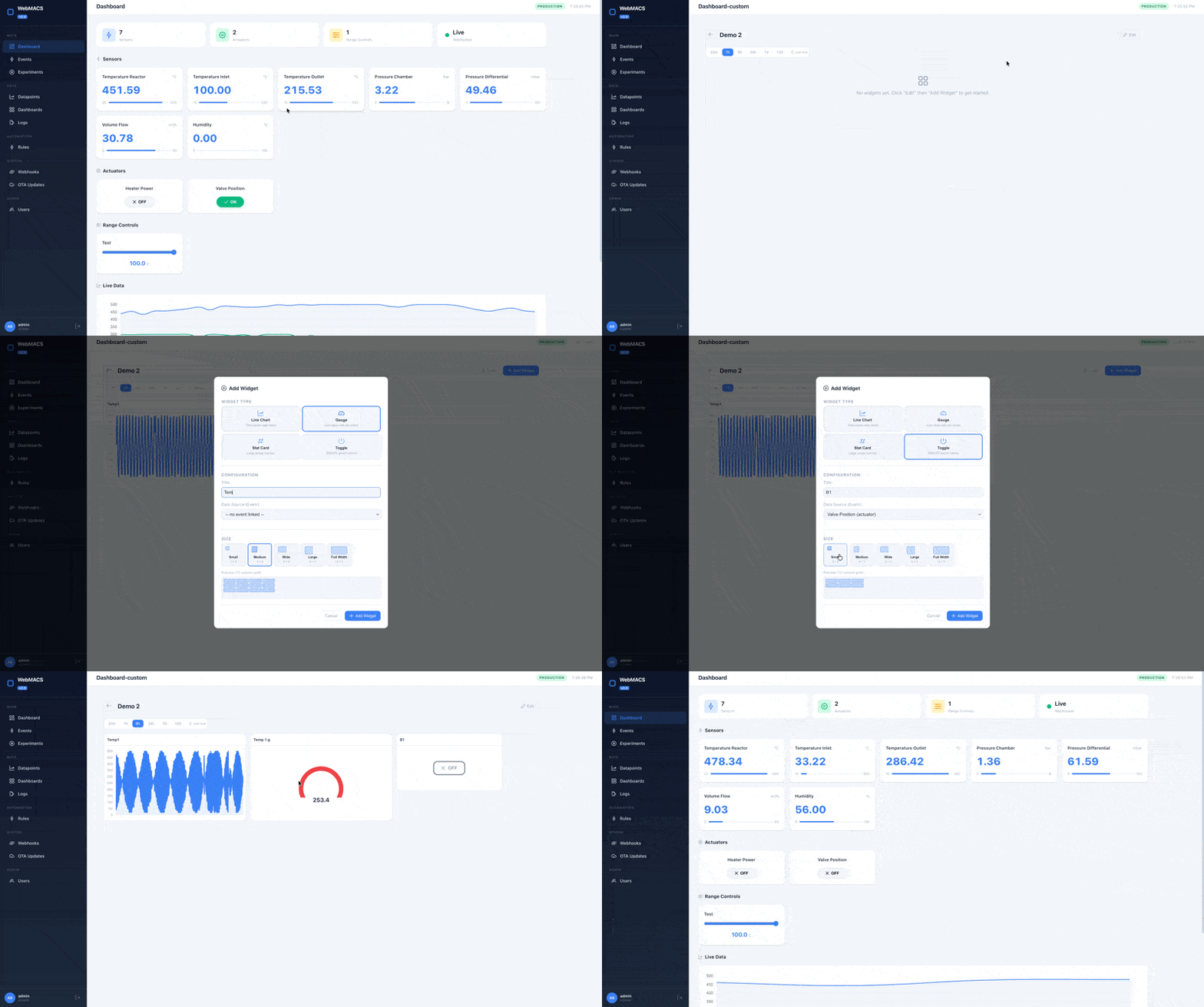
| Real-Time Dashboard | See every sensor value live, toggle actuators, build custom widget layouts — updated via WebSocket in under 100 ms |
| Experiment Management | Group all readings into named experiments. Start, stop, and export with one click |
| Custom Dashboards | Build your own dashboards with line charts, gauges, stat cards, and actuator toggles on a 12-column grid |
| Threshold Alerts | Define rules like "if temperature > 200 °C → notify Slack". No code required |
| Webhook Integrations | Push events to Slack, Teams, Node-RED, Home Assistant, or any HTTP endpoint |
| CSV Export | Download millions of datapoints as a CSV — streamed, instant, ready for pandas or Excel |
| Over-The-Air Updates | Deploy new versions via USB, file upload, or network — works fully offline |
| Plugin System | Connect any sensor or protocol — write a Python plugin, upload the .whl file, and see live data on your dashboard in under 20 minutes. No vendor, no recompilation. |
| One-Command Install | Single script installs Docker, generates credentials, starts all services, and enables auto-boot |
Your Process. Your Dashboard.
Traditional SCADA systems lock you into predefined screens. WebMACS lets every operator build their own dashboard — no programming required.
Pick from line charts, gauges, stat cards, and actuator toggles. Place them on a 12-column grid with size presets from compact to full-width. Each widget connects to a live sensor event and refreshes automatically — with proper axis labels, units, and time scales out of the box. Create as many dashboards as you need: one for the reactor, one for the chiller loop, one for the client demo.
10 minutes, not 10 days.
Your Sensors. Your Protocol. Your Plugin.
Need to read a Modbus sensor? A serial weather station? An MQTT topic? With
WebMACS, you don't wait for a vendor update — you write a Python class and
upload it as a .whl file.
The plugin SDK gives you:
- Five methods to implement —
get_channels,_do_connect,_do_disconnect,_do_read,_do_write - Built-in demo mode — simulate realistic data without hardware
- 13 free conformance tests — inherit from
PluginConformanceSuite - Automatic channel → event mapping — link a channel to an event and it flows into dashboards, alerts, CSV export, everything
- A complete example —
examples/custom-plugin/contains a ready-to-build Weather Station plugin with tests and documentation
20 minutes from idea to live data on your dashboard.
Connect WebMACS to Everything
WebMACS isn't a closed box — it's a Lego building block that fits into your existing infrastructure.
- 30+ REST endpoints — read and write every resource programmatically
- Plugin SDK — build custom device drivers in Python and upload them as
.whlpackages — Modbus, MQTT, serial, or any protocol - WebSocket streaming — sub-second live data for custom UIs
- HMAC-signed webhooks — push events to Slack, Node-RED, Home Assistant, or any HTTP endpoint
- CSV export — pipe data into pandas, Excel, or MATLAB
Think of it as a Swiss army knife for lab and plant data: one tool, unlimited integrations.
Get Started in 5 Minutes
# Transfer the bundle to your device and run:
sudo bash scripts/install.sh webmacs-update-2.0.0.tar.gz
Open http://<device-ip> and log in with the credentials shown during install.
See the Installation Guide for step-by-step details.
Open http://localhost and log in. See Quick Start for default credentials.
Quick Start Guide → View on GitHub →
Architecture at a Glance
graph LR
    Hardware["Sensors & Actuators"] -->|I/O| Controller["IoT Controller<br/>(Python)"]
    Controller -->|HTTP / WebSocket| Backend["FastAPI Backend"]
    Backend -->|async| DB[(PostgreSQL)]
    Frontend["Vue 3 Dashboard<br/>(Browser)"] -->|REST + WS| Backend
Backend -->|Webhooks| External["Slack / Teams / APIs"]| Layer | Technology |
|---|---|
| Backend | FastAPI · SQLAlchemy 2 async · Pydantic v2 · Python 3.13 |
| Frontend | Vue 3 · TypeScript · Vite · PrimeVue · Pinia |
| Controller | Python 3.13 · HTTPX · RevPi I/O |
| Database | PostgreSQL 17 |
| Deployment | Docker Compose · Nginx · systemd |
Documentation Map
| Section | For | What You'll Find |
|---|---|---|
| Getting Started | Everyone | Install, configure, first login |
| User Guide | Operators & Engineers | Dashboard, experiments, rules, plugins, CSV export, OTA |
| Architecture | Developers | System design, WebSocket protocol, database layer |
| API Reference | Developers | REST + WebSocket endpoint docs, Pydantic schemas |
| Development | Contributors | Code style, testing, CI/CD, how to contribute |
| Deployment | DevOps | Docker, production hardening, environment variables |
Built With
Python 3.13 — Backend & Controller
Vue 3 — Reactive SPA with TypeScript
PostgreSQL 17 — Reliable, proven storage
Docker Compose — One command, all services
Contributing
Contributions are welcome! See the Contributing Guide for development setup and workflow.
License
MIT — see LICENSE for details.